SWE-bench#
Note
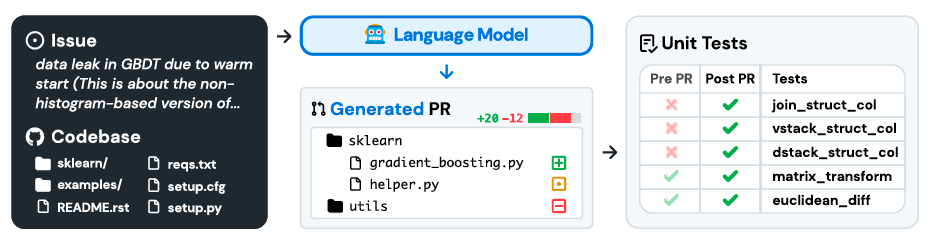
SWE-bench is a benchmark for evaluating large language models on real world software issues collected from GitHub. Given a codebase and an issue, a language model is tasked with generating a patch that resolves the described problem.
SWE-bench#
Benchmark Construction#
To find high-quality task instances at scale, we use a 3-stage pipeline as follows.
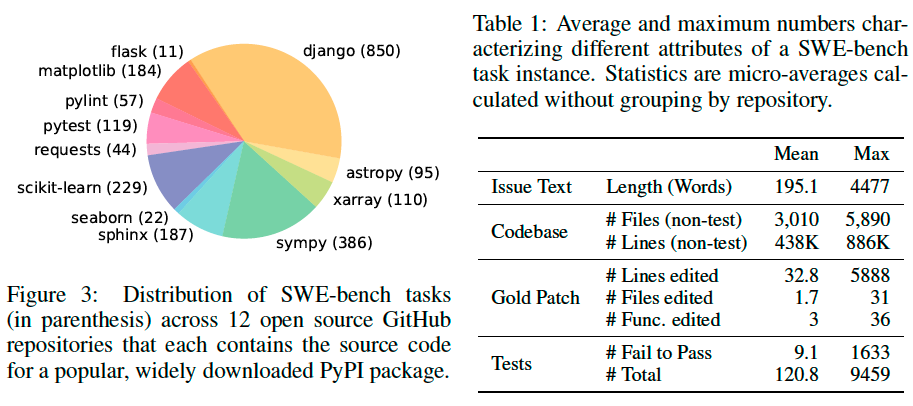
Repo selection and data scraping. We start by collecting pull requests (PRs) from 12 popular open-source Python repositories on GitHub, producing about ∼ 90,000 PRs in total.
Attribute-based filtering. We create candidate tasks by selecting the
mergedPRs that (1) resolve a GitHub issue and (2) make changes to the test files of the repository.Execution-based filtering. We filter out task instances without at least one test where its status changes from a fail to pass.
Features of Swe-Bench#
Real-world software engineering tasks.
Continually updatable.
Diverse long inputs.
Robust evaluation.
Cross-context code editing.
Wide scope for possible solutions.
SWE-bench Lite#
To encourage adoption of SWE-bench, we create a Lite subset of 300 instances from SWE-bench that have been sampled to be more self-contained, with a focus on evaluating functional bug fixes.
SWE-Llama: Fine-Tuning Codellama for SWE-bench#
Training data. We follow our data collection procedure and collect 19,000 issue-PR pairs from an
additional 37 popular Python package repositories. We do not require
that pull requests contribute test changes. This allows us to create a much larger training set to use
for supervised fine-tuning. To eliminate the risk of data contamination, the set of repositories in the
training data is disjoint from those included in the evaluation benchmark.
Experimental Setup#
Retrieval-Based Approach#
SWE-bench instances provide an issue description and a codebase as input to the model. While issues descriptions are usually short (195 words on average), codebases consist of many more tokens (438K lines on average) than can typically be fit into an LMs context window. Then the question remains of exactly how to choose the relevant context to provide to the model?
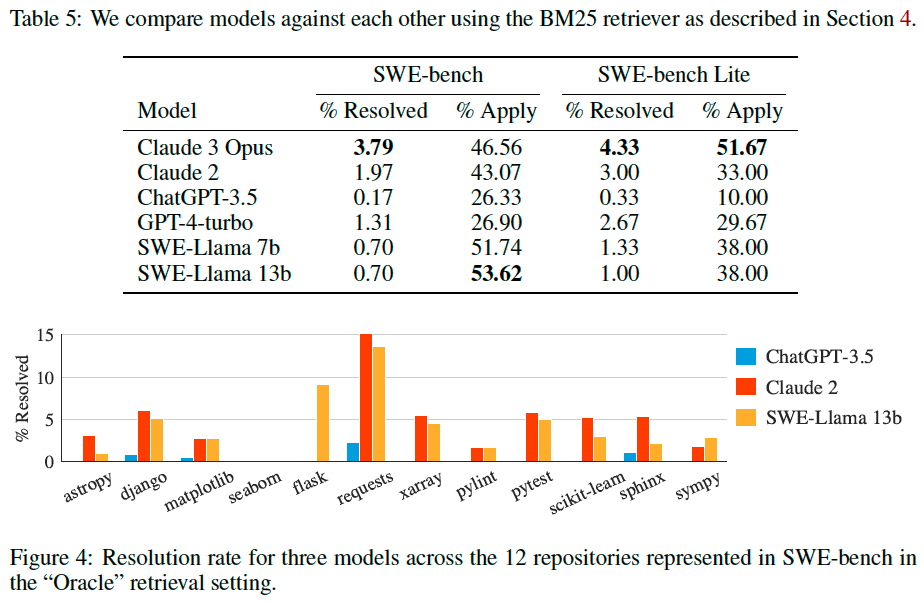
Sparse retrieval. We choose to use BM25 retrieval to retrieve relevant files to provide as context for each task instance.
“Oracle” retrieval. For analysis purposes we also consider a setting where we “retrieve” the files edited by the reference patch that solved the issue on GitHub.
Input Format#
Once the retrieved files are selected using one of the two methods above, we construct the input to the model consisting of task instructions, the issue text, retrieved files and documentation, and finally an example patch file and prompt for generating the patch file.
Results#